Visualize your Mac's storage
at the speed of light.
DiskView is a lightweight, high-performance native macOS utility built with Swift. Uncover massive folders, runaway caches, and hidden disk hogs with vibrant, GPU-accelerated squarified treemaps.
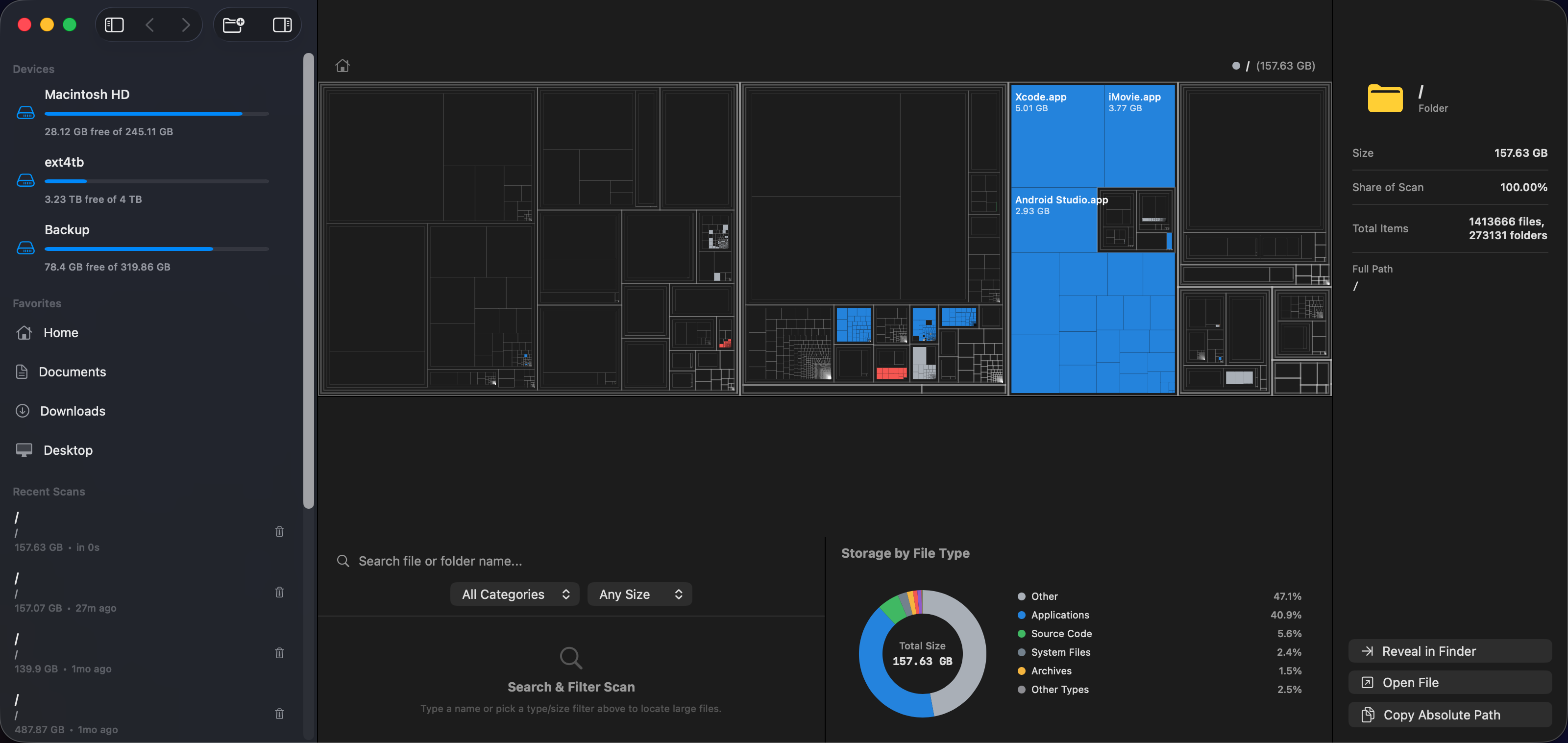
See how squarified treemaps work in real-time
Unlike slow file lists, squarified treemaps scale each block proportional to its actual storage size. Click blocks to drill down, or filter by category below.
Built purely in Swift. No Electron. Zero bloat.
Every line of code is optimized for macOS APFS, multi-core Apple Silicon, and 60fps GPU rendering.
Asynchronous Swift Traversal
Scans hundreds of thousands of files on non-blocking background queues. Throttled UI streaming keeps the macOS interface buttery smooth even during intensive disk I/O.
Bruls Squarified Treemaps
Organizes storage into near 1:1 aspect-ratio rectangles. Drawn directly on a GPU-accelerated SwiftUI Canvas for lightning-quick 60fps zooms and transitions.
Instant Search & Filtering
Filter files by keyword, extension, or size threshold (e.g. > 1 GB). Instantly highlights matches while dimming irrelevant files without re-scanning.
100% Private & Offline
No tracking, no telemetry, no cloud accounts, and no network requests. DiskView runs entirely on your local machine and respects Apple's sandboxing and TCC rules.
Deep APFS Intelligence
Correctly understands APFS sparse files, packages (.app, .framework bundles), dataless cloud placeholders, and symlinks to prevent false size warnings or loops.
Instant Session Cache
Scanned trees are preserved securely in local Application Support JSON cache. Return to previous scans instantly without waiting for a re-scan.
Honest, fast, and respectful of your Mac
Compare DiskView against default macOS tools and subscription-heavy commercial utilities.
| Feature / Capability | DiskView | macOS Finder / Storage | DaisyDisk | CleanMyMac |
|---|---|---|---|---|
| Price | Free | Free (Built-in) | $9.99 | $39.95 / year |
| Technology | Swift & SwiftUI (Native) | System Settings | Native App | Heavy Background Agent |
| Squarified Treemap Visualization | ✓ Instant (Canvas 2D) | ✕ List / Bar only | ✓ Sunburst Chart | ✕ Categorical Lists |
| Download Size | < 1 MB | N/A | ~15 MB | ~120 MB |
| Background Telemetry & Daemons | Zero (0 Daemons) | Apple Analytics | Minimal | ✕ Constant Daemons |
| APFS Package & Sparse Handling | ✓ Fully Supported | △ Often Miscalculated | ✓ Supported | △ Proprietary categorization |
| Fast Real-Time Search & Filters | ✓ Instant O(N) | Slow Spotlight search | Manual drilldown | Preset filters |
Reclaim space in three simple steps
From zero to gigabytes saved in under 30 seconds.
Select Volume or Folder
Choose your internal Macintosh HD, an external backup drive, or a specific directory like ~/Library or Downloads.
Scan at SSD Speed
Watch DiskView aggregate millions of blocks asynchronously without ever locking up your UI or draining your Mac battery.
Inspect & Reclaim
Pinpoint the largest blocks immediately. Right-click any block to Reveal in Finder and delete old renders, caches, or duplicate archives.
Designed for Mac Power Users
Navigate through directories without leaving your keyboard.